
Penetration test reporting tools compared
Slate, with Flint, against PlexTrac, Dradis, Cyver Core and AttackForge, row by row.
Slate takes an engagement from the findings to a reviewed report, a signed attestation letter and a client portal your clients use for free. Built by PenTest Hub, a penetration testing company, for its own engagements: Slate from €55 per user a month, and clients never count as users.
Checked on the vendors' own websites in 2026.
What every edition of Slate gives you.

 An attestation letter, signed on deliveryGenerated from the engagement and signed when the report is issued, for your client to hand to an auditor or a customer. None of the other four publishes one.
 Nothing reaches the client before reviewEach engagement lists what it still needs, from the executive summary to a second consultant's approval, and nothing is issued until it is approved. Drafts stay watermarked.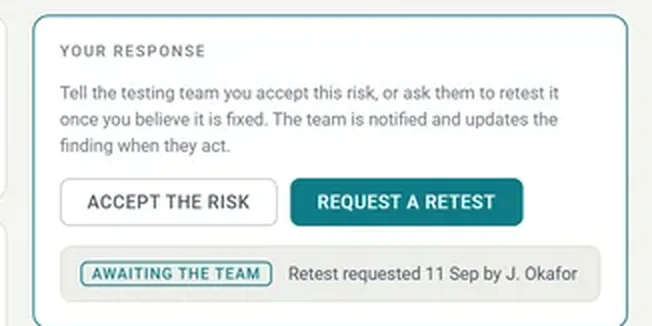
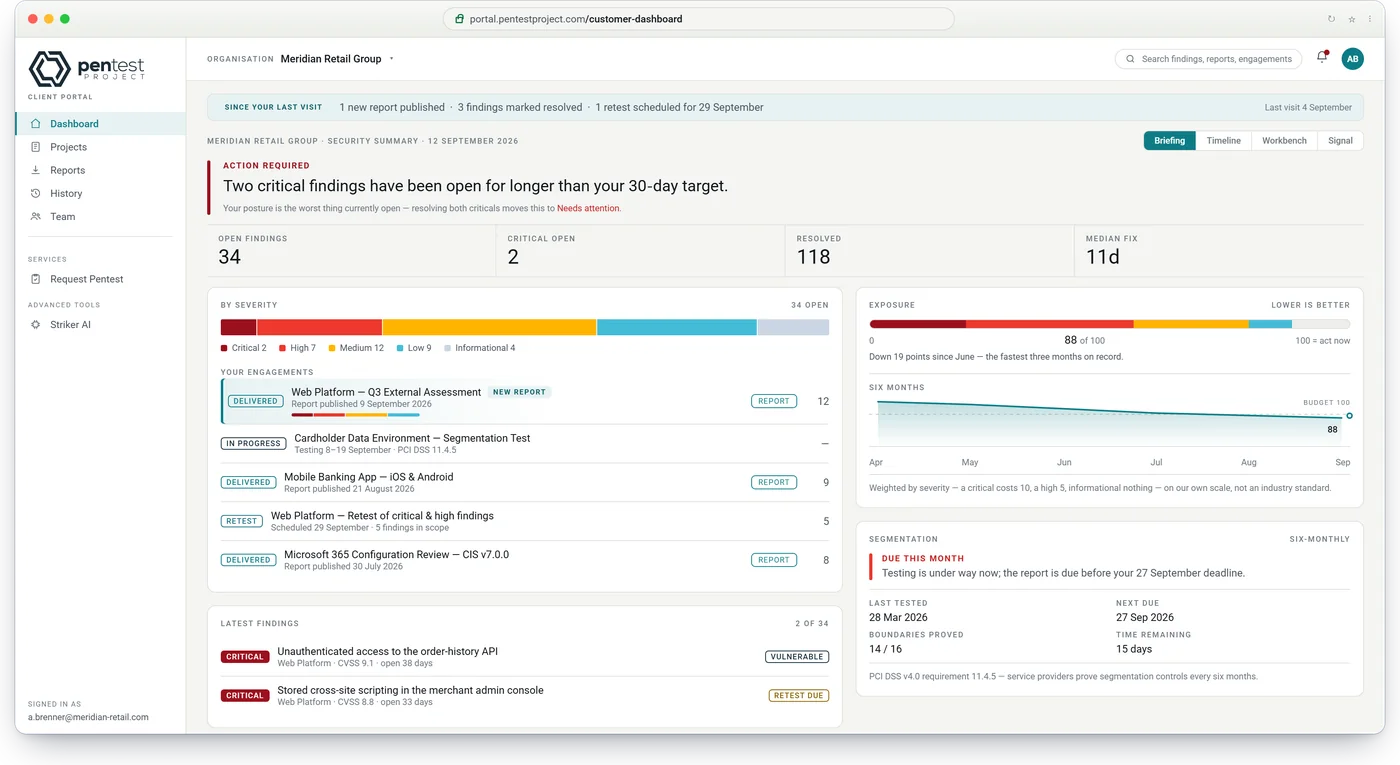
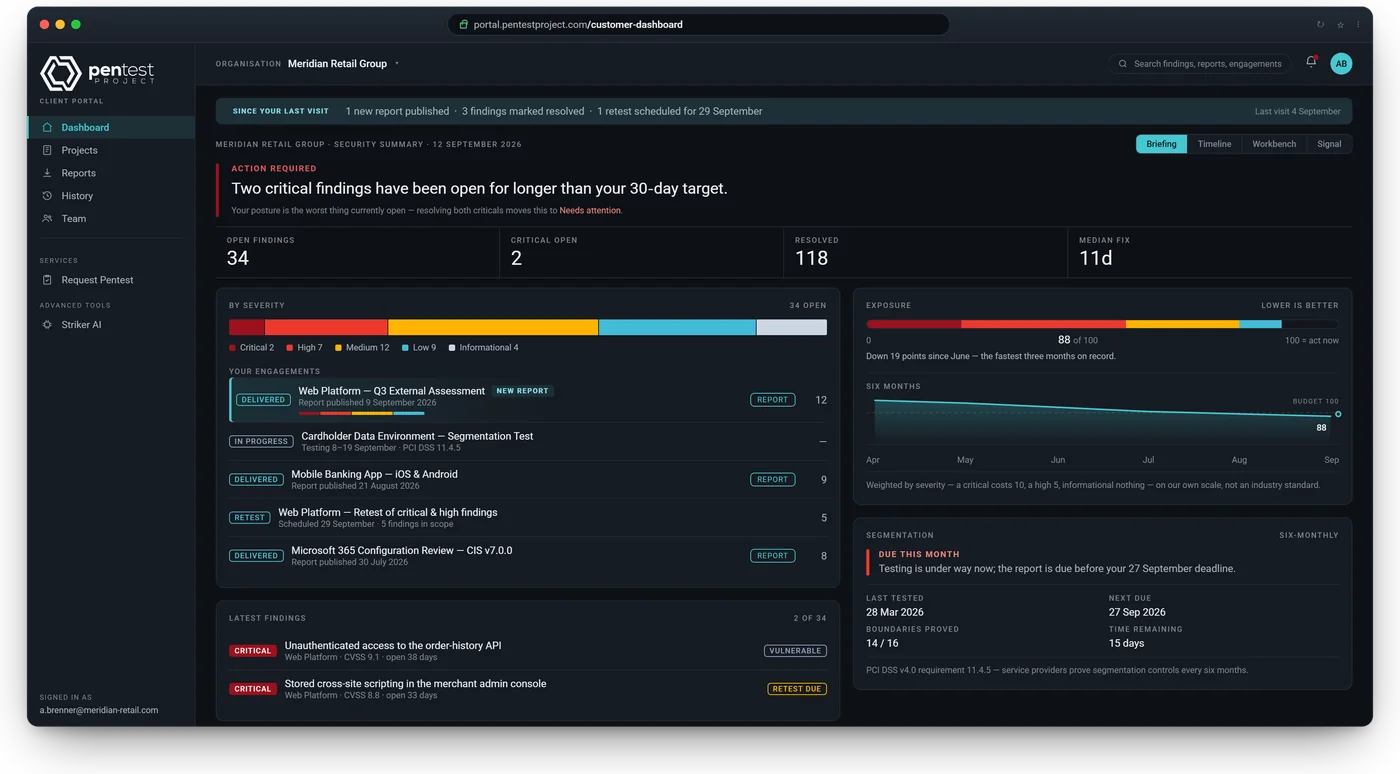
 Your client answers finding by findingIn the client portal they request a retest or accept the risk on each finding, and your team is notified. Client users are free and unlimited, with single sign-on, on every edition.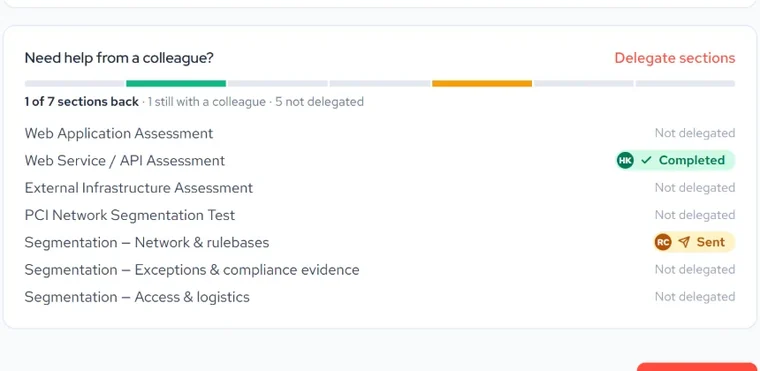
 With Flint, the client side before the testYour client scopes per service, hands sections to colleagues by link and signs a statement of work priced from your rates. Flint is licensed on its own; the others bundle scoping into reporting.
Five tools, nineteen questions buyers ask.
The rows follow an engagement: buying and running the tool, signing in, the client side before the test, then reporting and delivery. Rows with a tag need Flint, which is licensed separately. Filter the table to the rows where the others fall short, or compare Slate with one tool at a time. Weighing Flint against Jira, YouTrack, monday.com or ClickUp instead? See Flint vs project management tools.
| Slate, with FlintRows marked "with Flint" need Flint | PlexTrac | Dradis | Cyver Core | AttackForge | |
|---|---|---|---|---|---|
| Buying and running it | |||||
| Published prices | ✓Slate from €55, Flint €2.75 per user a month | ✕No; prices on request only | ✓From €90 per seat a month, billed yearly, 3 seats minimum; Enterprise on request | ✓Team €249 a month for up to 5 testers, Professional €549 with unlimited testers, billed yearly; Enterprise on request | ✓$50, $150, $300 or $800 a month for 1 to 20 testers; Enterprise on request |
| Scoping sold apart from reporting | ✓Flint and Slate are licensed and priced on their own; buy only the one you need | ✕Not offered; scheduling and assessments come bundled in every package | ✕Not offered; scheduling and questionnaires come bundled with reporting | ✕Not offered; planning comes with reporting, from Enterprise | ✕Not offered; every plan bundles requests with reporting |
| Hosted by the vendor | ✓A dedicated instance in the region you choose, on every edition | ✓Shared or private instance | ✕Not offered; self-hosted only | ✓Hosted | ✓A dedicated tenant |
| Self-hosted | ◐Enterprise; activation, licence checks and updates work offline | ✓On-premises with Docker | ✓Every plan; fully offline, activation included | ◐From Professional; air-gapped as an Enterprise add-on | ◐Enterprise; built for air-gapped use |
| Sign-in and access | |||||
| Client portal | ✓Every edition; client users free and unlimited | ✓Every package | ✓Client accounts free and unlimited | ◐5 users per client on Team; unlimited from Professional | ✓Unlimited client users |
| Single sign-on | ✓Every edition; Microsoft Entra ID, Google Workspace or any OpenID Connect provider, for your team and client portal users | ✓SAML or OpenID Connect; plan not published | ◐Enterprise plan; SAML, Okta, Microsoft Entra ID, LDAP or Active Directory | ◐Google or Microsoft from Professional; SAML on Enterprise | ◐Enterprise plan; OpenID Connect |
| Two-step sign-in | ✓Every edition; authenticator app, required by you, or by a client for its own users | ✓Authenticator app, can be required | ✓Every plan; authenticator app or Duo; Azure MFA on Enterprise | ✓Every plan | ✓Authenticator app, on by default |
| Before the test | |||||
| Client scoping with Flint | ✓A questionnaire per service; the client answers only what applies to what they buy | ◐Limited: questionnaires and engagement requests, with no section hand-over and no priced statement of work | ◐Limited: questionnaires through the portal, with no section hand-over and no priced statement of work | ◐Limited: custom request forms, with no section hand-over | ◐Limited: a request form with a service catalogue, with no section hand-over and no priced statement of work |
| Client hands sections to colleagues with Flint | ✓Each colleague gets their own link, needs no account and sees only their section | ✕Not offered; the whole assessment is shared with existing accounts | ✕Not offered; a questionnaire is shared as a whole | ✕Not offered; one request workspace for the client | ✕Not offered; access is set per whole project request |
| Quote and statement of work with Flint | ✓Drafted from the scoping answers, priced from your own rates, signed online by the client | ✕Not offered; no built-in statement of work or online acceptance | ✕Not offered | ◐Quotes and statements of work for approval, as a paid add-on | ✕Not offered |
| Invoicing with Flint | ✓Invoices raised from the accepted statement of work | ✕Not offered | ✕Not offered | ◐Quotes and prepaid credits on the Ultimate plan | ✕Not offered |
| Project planning with Flint | ✓Gantt, month grid and list; drag a project to new dates, with tester clashes and time off shown before you confirm; report due and retest dates marked | ◐Calendar and availability; dates changed in a form | ◐Monthly calendar; dates changed in a form | ◐Calendar and Gantt on Enterprise; dates changed in a form | ◐Calendar by month, week or day; dates changed in a form |
| Team planning with Flint | ✓Tester groups, time off and team availability; workload and ageing reports available as an add-on | ✓Resource availability view | ✓Team availability in the scheduler | ◐Holidays and timesheets on Enterprise | ◐Resource view of who has capacity; no time-off tracking |
| Reporting and delivery | |||||
| Review before a report is issued | ✓Every engagement shows what it still needs, up to a second consultant's approval; drafts are watermarked until the report is issued | ✓Report statuses up to Approved, with named reviewers | ✓Draft, review and publish states; only set reviewers can publish | ✓Findings reviewed before the client sees them, every plan | ◐QA review and approver fields you configure, from the Team plan |
| Client requests a retest per finding | ✓In the client portal, on each finding: request a retest or accept the risk, and your team is notified | ✕Not offered; the client sees each finding's status | ◐In part: remediation tickets and comments on Remediate; no retest request | ✓A Request Retest button on each finding, every plan | ✓Clients flag findings for retest and request a retest round |
| Attestation letter on delivery | ✓Generated from the engagement and signed when the report is issued | ✕Not offered | ✕Not offered | ✕Not offered; a copy of the report for third parties instead | ✕Not offered |
| AI assistant with Flint | ✓AI Wingman in Flint, for everyone who signs in to Flint: briefs you, looks things up, drafts statements of work and invoices and reschedules work, only after you confirm | ◐Plex AI writes findings and report text; a paid add-on | ✓Echo summarises and rewrites findings, locally or in the cloud | ✓Writing copilot; MCP server for outside AI agents | ◐Connect your own AI assistant through MCP; a paid upgrade below SME |
| Report formats | ✓PDF, Word and Excel | ✓PDF, Word, Markdown | ✓Word, Excel, HTML, PDF and CSV | ✓PDF, Word; HTML on Enterprise | ✓Word |
| Data export | ✓Findings to Excel; reports as PDF, Word and Excel. With Flint, a REST API with JSON for engagements and scope | ✓CSV, XML and JSON; API on Premium | ✓CSV and JSON; REST API on every plan | ✓XML, CSV and Excel; REST API; webhooks on Enterprise | ✓JSON and evidence archive; REST API, a paid upgrade below SME |
| Built in, of 19 rows | 18 of 19Slate alone: 11 of the 12 rows not marked with Flint | 9 of 19 | 9 of 19 | 8 of 19 | 7 of 19 |
No gaps on this filter: this tool matches Slate and Flint on every row shown.
- Scanner imports: Slate imports Nessus results from CSV, while PlexTrac, Dradis and Cyver Core each list 20 or more scanner and tool integrations.
- Offline use: Dradis runs fully offline on every plan; Slate's Server version comes with Enterprise.
- Single sign-on: PlexTrac, Dradis and Cyver Core support SAML; Flint and Slate use OpenID Connect, with Microsoft Entra ID, Google Workspace, Okta and others.
- Price for a small team: AttackForge starts at $50 a month for one tester, and Cyver Core's Team plan is €249 a month for up to 5 testers.
Slate is from €55 and Flint €2.75 per user a month, each licensed on its own; client users are free and unlimited on every edition. Not offered means we did not find the feature in the vendor's product pages, pricing pages or documentation when we checked in 2026. Prices exclude VAT where the vendor says so and are per month unless stated.
Plan names are the vendors' own; prices and features change, so check the vendor's site before you buy. Product names are trademarks of their owners; this page is not endorsed by any of the vendors.
Flint, licensed on its own, against Jira, YouTrack, monday.com and ClickUp: client scoping, signed statements of work, invoices and time-off-aware planning.
Flint vs project management toolsSlate's Server version on Enterprise: online or offline activation, no call home, and signed updates imported as files.
Self-hosted and air-gappedIf budget comes first.
All of these are self-hosted, supported by their communities rather than a vendor, and none offers a client portal like the commercial tools.
- PwnDoc
- MIT licence, actively maintained. Findings and reviews in the browser, reports in Word from your own template.
- Ghostwriter
- BSD licence, from SpecterOps. Built around red team operations: infrastructure, domains and activity logs, with Word, PowerPoint and Excel output.
- WriteHat
- GPL licence. Reports assembled from components in Markdown and rendered to PDF and HTML.
- Reconmap
- MIT licence, with project management, an API and integrations; a hosted version is sold separately.
- Dradis CE
- GPL licence, the free edition of Dradis; one project at a time.
Choosing a reporting tool.
It depends on the job. For a reviewed report, a signed attestation letter and a client portal, with scoping in Flint priced on its own, Slate. For self-hosting only, fully offline, with an open-source core, Dradis. For the largest integration catalogue of the four, PlexTrac. For free and open source, PwnDoc or Ghostwriter.
Dradis on every plan, AttackForge and Slate on their Enterprise editions, and Cyver Core as an Enterprise add-on. Check what activation and updates need: with Slate and Dradis both work offline.
Slate, PlexTrac, Dradis, Cyver Core and AttackForge. Slate, Dradis and AttackForge state that client users are free and unlimited; Cyver Core allows 5 client users per client on its Team plan.
Slate and Flint include single sign-on and two-step sign-in in every edition. Dradis and AttackForge keep single sign-on for their Enterprise plans, and Cyver Core offers Google or Microsoft sign-in from Professional and SAML on Enterprise; PlexTrac does not publish which plan includes it.
Slate generates one and signs it when the report is issued. None of the other four publishes such a feature; Cyver Core offers a copy of the report for third parties instead.
Of the four, PlexTrac lists the most, with more than 50 integrations in its marketplace, most of them scanner and findings sources. Dradis lists 47+ integrations and Cyver Core names 21 tools. Slate imports Nessus results from CSV, and nmap output serves as segmentation evidence in PCI engagements.
Yes, with Flint: €2.75 per user a month on its own, and Slate can be added later. PlexTrac, Dradis, Cyver Core and AttackForge include scoping and scheduling in their reporting plans.
Flint does. Each colleague gets their own link, needs no account and sees only the sections handed to them. PlexTrac, Dradis, Cyver Core and AttackForge share a whole questionnaire or project request instead.
Yes: PwnDoc, Ghostwriter, WriteHat and Reconmap are open source, and Dradis has a free Community edition for one project at a time.
See Slate with sample data in 30 minutes.
We walk through one engagement, from the findings to the reviewed report, the attestation letter and your client's portal. Slate is from €55 per user a month, and your clients never count as users.
Not ready for a call? Email us at info [at] pentest-hub.com.
- 1Your team's sideThe engagement workflow, the findings library and what each engagement still needs before it is issued.
- 2The reportPDF, Word and Excel from one template, reviewed and approved, with the attestation letter.
- 3Your client's sideThe client portal: the verdict, open findings, and a retest or accepted risk on each finding.