

Built for penetration testing, or configured for it?
Jira, YouTrack, monday.com and ClickUp are good general tools that you can shape into a penetration testing workflow. Flint ships with one built in.
Elsewhere that takes your own configuration, higher plans and paid add-on apps. In Flint your client scopes the test, hands sections to colleagues, signs the statement of work and gets ready for day one, all from links and without an account. Built by PenTest Hub, a penetration testing company, for its own engagements: €2.75 per user a month, and clients never count as users.
Checked on the vendors' own websites in 2026.
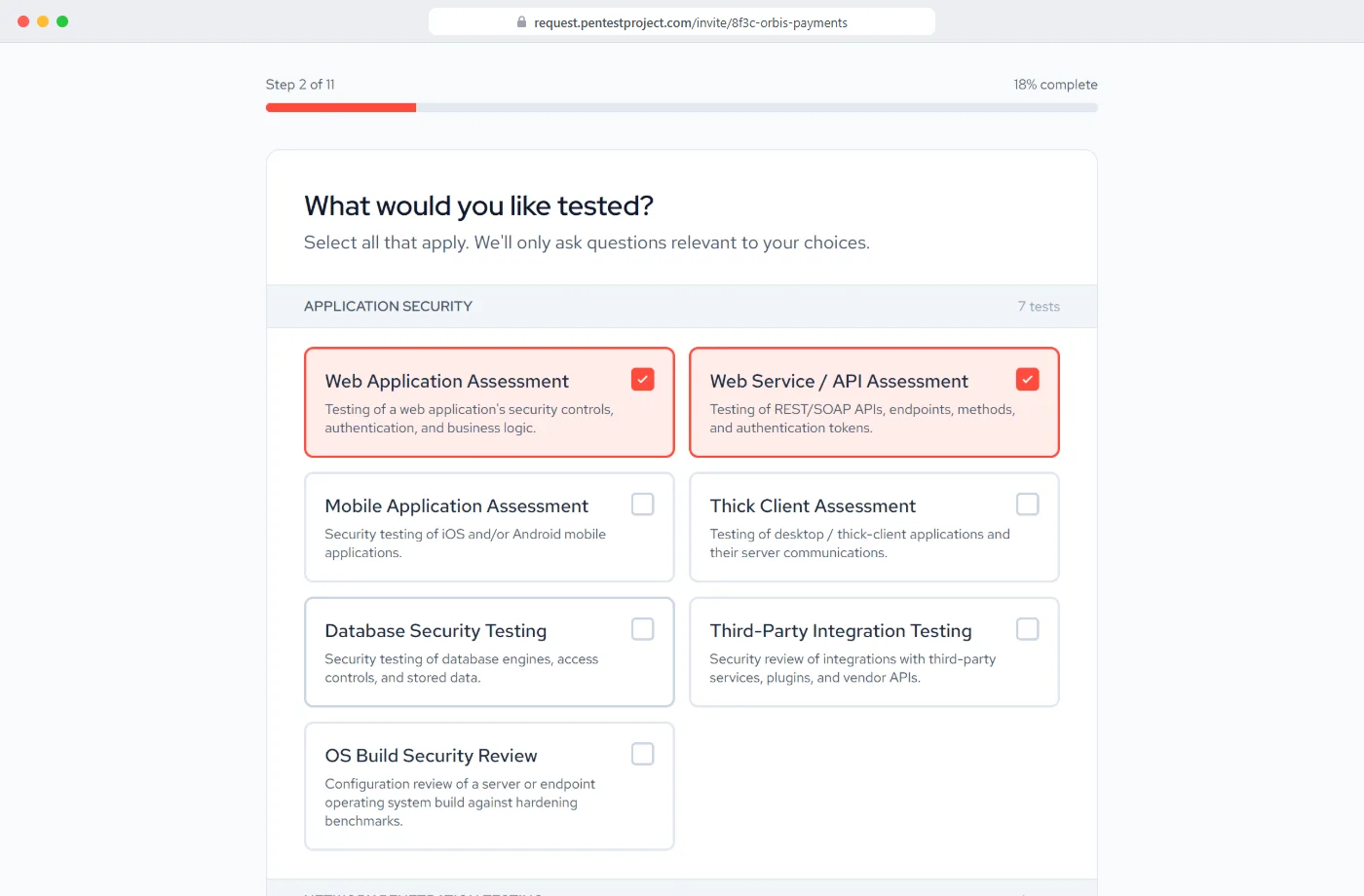
Built in here, configured or missing elsewhere.
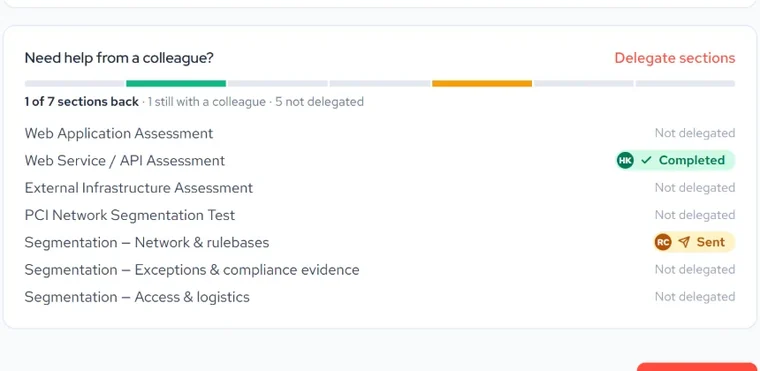
 Your client hands a section to a colleagueNetwork details to IT, contracts to procurement: each colleague answers from their own link and sees only their section. Not offered in any of the four general tools.
 A statement of work from the answers, signed onlinePriced from your packages and day rate, then signed from a link. Elsewhere it takes a paid app, a separate product or a template filled in by hand.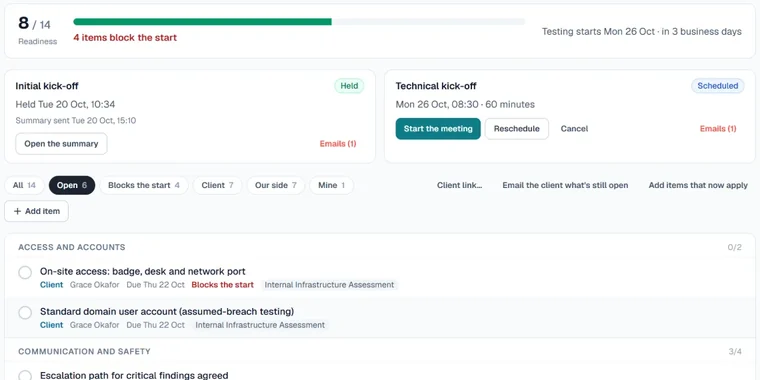
 A checklist before day oneWritten authorisation, test accounts (never passwords) and allowlisting, each with an owner and a due date, built from the scoping answers.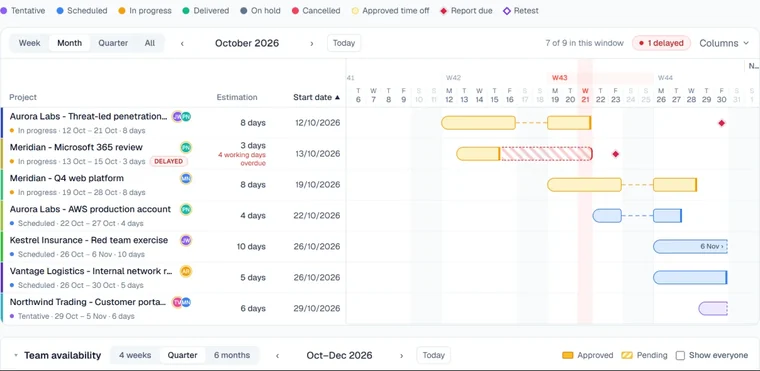
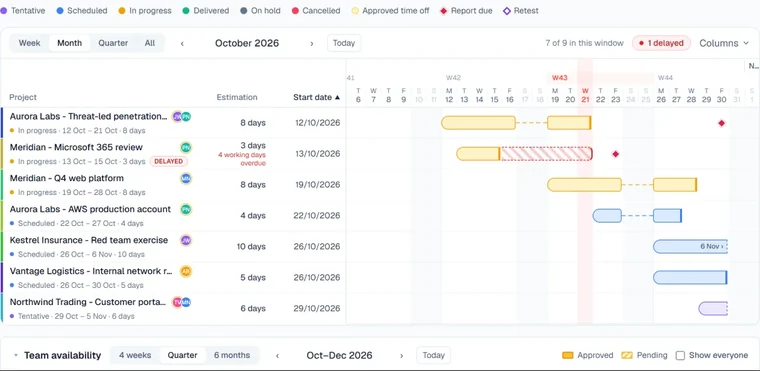 Time off seen before you book a testerApproved time off and tester clashes shown before you save, in every edition. Elsewhere only on higher plans, and YouTrack does not offer it.
Five tools, thirteen questions.
The rows follow an engagement from the first request to the first day of testing. Some are basics every tool covers, and on questions that depend on earlier answers Jira and YouTrack go further than Flint. Filter the table to the rows where the others fall short, or compare Flint with one tool at a time.
| Flint€2.75 per user a month | JiraFree to 10 users; Standard $9.70 per user a month | YouTrackFree to 10 users; then $4.50 per user a month | monday.comFrom €9 per seat a month, 3 seats minimum | ClickUpFree plan; Unlimited $7 per user a month | |
|---|---|---|---|---|---|
| Getting the request | |||||
| Client request form without an account | ✓The client scopes from an invitation link; no account | ✓Public forms: anyone with the link can submit, no Jira account needed | ✓Helpdesk online forms; no sign-up, a reporter account is created from the email address | ✓WorkForms: anyone with the link can submit | ✓Shared Forms, on Unlimited and higher |
| Questions that depend on earlier answers | ◐Questions follow the services chosen, and some lists fill from earlier answers; no branching on a single answer | ✓Fields shown based on earlier answers, up to three levels deep | ✓Conditional fields in online forms, one level deep | ◐Conditional logic in WorkForms on Enterprise | ◐Conditional logic in Forms on Business Plus and Enterprise |
| A question set per testing service | ✓The client picks services from 22 catalogues and sees only their questions | ◐With your own setup of conditional fields | ◐With your own setup of conditional fields | ◐With your own setup, using conditional logic on Enterprise | ◐With your own setup, using conditional logic on Business Plus |
| Client hands one section to a colleague by link | ✓Each colleague gets their own link and sees only their section | ✕Not offered; forms are shared and submitted whole | ✕Not offered | ✕Not offered; one link per form | ✕Not offered; one link per form |
| Selling the work | |||||
| Statement of work drafted from the answers, priced from your rate cards | ✓Drafted from the answers; your package prices and day rate fill the lines | ◐Only with a paid Marketplace quote app; none drafts from intake answers | ✕Not offered | ◐Quotes only in monday CRM, a separate product; not drafted from form answers | ◐Penetration testing statement-of-work document templates, filled in by hand |
| Signed online by the client, signed copy kept | ✓Signed from a link; the signed copy is emailed and every accepted version kept | ◐Only with a paid Marketplace e-signature app | ✕Not offered | ◐A signature question in WorkForms; quotes cannot yet store countersigned documents | ◐A signature custom field, not a signed statement of work |
| Invoice raised from the accepted statement of work | ✓Client, price and purchase order filled in; numbering, VAT and PDF | ◐Only with a paid Marketplace invoicing app, from worklogs | ✕Not offered | ◐Invoices only in monday CRM, a separate product | ◐No invoice generation; invoices kept by hand in Docs |
| Planning the work | |||||
| Gantt or timeline | ✓Projects page: Gantt, month grid and list | ✓Timeline on every plan; cross-project plans on Premium | ✓Interactive Gantt charts | ✓Gantt and Timeline views from Standard | ✓Gantt view from Unlimited |
| Works without sprints | ✓Plans in engagements, not sprints | ✓Kanban boards run without sprints | ✓Sprints can be switched off per board | ✓Work Management boards have no sprints | ✓Sprints are an optional feature you switch on |
| Time-off-aware scheduling | ✓Approved time off and tester clashes shown before you save, in every edition | ◐Capacity planning on Premium and Enterprise; leave entered by hand | ✕Not offered | ◐Time off in Workload on Pro and Enterprise, in gradual release | ◐Personal time off on Business Plus and Enterprise |
| Before day one | |||||
| Authorisation, test accounts and allowlisting tracked before testing | ✓Written authorisation, third-party permission, test accounts (never passwords) and allowlisting | ◐With your own custom fields or forms | ◐With your own custom fields | ◐With your own board columns | ◐With your own setup; a pentest SOP template mentions obtaining permissions |
| Checklist before day one built from the scoping answers | ✓Built from the client's answers and your template, with owners and due dates | ◐Only with automation rules or a paid Marketplace checklist app | ◐Only with a Marketplace checklist app or your own workflow scripts | ◐With your own automation recipes; no checklist built from answers | ◐Generic checklist templates; building them from answers needs automations |
| Kick-off notes that end in rules of engagement | ✓Live notes and screenshots; rules of engagement sent to every attendee | ◐Meeting-notes templates in Confluence, a separate product | ◐Knowledge Base articles, set up by you | ◐Generic meeting notes with AI Notetaker and Docs | ◐Generic meeting notes with AI Notetaker and Docs |
| Built in, of 13 rows | 12 of 13 | 4 of 13 | 4 of 13 | 3 of 13 | 3 of 13 |
No gaps on this filter: this tool matches Flint on every row shown.
Flint is €2.75 per user a month on every edition. Everything in its column is included in that price; none of it is an add-on.
The others' list prices in 2026, before tax and in the currency each vendor publishes: Jira Standard $9.70 and Premium $19.60 per user a month for up to 100 users, billed monthly; YouTrack $4.50 per user a month billed yearly or $5.40 monthly; monday.com Basic €9, Standard €12 and Pro €19 per seat a month billed yearly, Enterprise on quote; ClickUp Unlimited $7 and Business $12 per user a month billed yearly, Enterprise on quote. Higher plans, paid add-on apps and separate products named in the table cost extra.
Not offered means we did not find the feature in the vendor's product pages, pricing pages or documentation when we checked in 2026. Plan names are the vendors' own; features change, so check the vendor's site before you buy. Product names are trademarks of their owners; this page is not endorsed by any of the vendors.
Flint is complete on its own. Add Slate, licensed separately, and each engagement opens there with the client, scope, dates, testers, test accounts (never passwords) and rules of engagement filled in. Issuing the report marks it delivered in Flint.
See SlatePlexTrac, Dradis, Cyver Core and AttackForge include scoping in their reporting plans; Flint is licensed on its own. See how Flint and Slate compare with them on price, hosting, the client portal and scoping.
Slate vs reporting toolsFlint or a general tool, in short answers.
A client who scopes the work, a statement of work they sign, proof of authorisation before anyone tests, and a plan that knows who is on leave. General tools can be configured for each of these with custom fields, automations and add-on apps; Flint has them built in.
No, and neither do the general tools. Jira, YouTrack and the others all offer simple boards and timelines. The difference is what a project is. In Flint it is an engagement: a client, a scope, a signed statement of work, testers, a start date, a report due date and a retest. That is how penetration testing is sold and delivered.
Not directly. Flint runs alongside Jira or YouTrack: they keep your development work, and Flint holds your client engagements. Flint's engagements and scope are available as JSON through its REST API.
Not on their own. Jira needs a paid Marketplace e-signature app, monday.com offers a signature question in WorkForms, ClickUp a signature custom field, and YouTrack does not offer it. In Flint the statement of work is drafted from the client's answers and signed from a link, and the client gets the signed PDF by email.
Yes. Flint comes with 22 service catalogues that your administrators can edit, so clients see your questions for the services they pick.
Flint shows approved time off and tester clashes before you save, in every edition. Jira offers capacity planning on Premium and Enterprise, with leave entered by hand; monday.com shows time off in Workload on Pro and Enterprise, and ClickUp personal time off on Business Plus and Enterprise. YouTrack does not offer it.
See Flint with sample data in 30 minutes.
We walk through one request, from the client's first answer to the signed statement of work and the plan. Flint is €2.75 per user a month on its own, and your clients never count as users.
Not ready for a call? Email us at info [at] pentest-hub.com.
- 1Your client's sideServices and their questions, and sections handed to colleagues by link.
- 2The statement of workDrafted from the answers, priced from your rates and signed from a link.
- 3Your sideThe plan with time off and tester clashes, and the checklist before day one.